
RawAAC→M4A0.9 - Get APK
You'll be able to download in few seconds.
Publisher Description

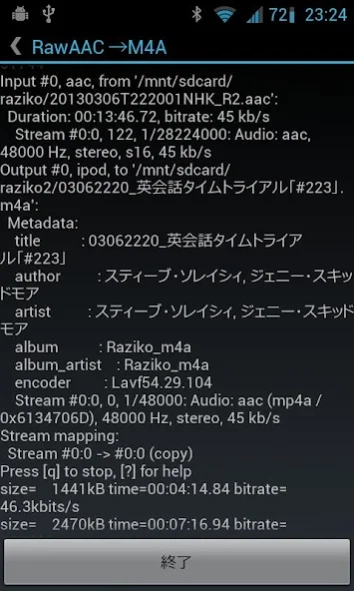
Convert ADTS Raw AAC files to M4A files
Due to the terms of Google Play, it is not possible to update with the current application configuration, so after 0.10 version, it will be published in the following folder.
https://drive.google.com/drive/folders/1WMKDPv8zwRPwPnaiCx3aI4FNu7ToQqFa
After installing this 0.9 version from Google Play, download the latest version from the above and install the update, you can confirm that the encryption key of the apk file itself matches the previous one, and you can confirm that it is not another application with the same name. ..
Convert ADTS Raw AAC files to M4A files. It works fast because it's just put in an MP4 container, not decode-encoded.
It is mainly intended for conversion of files recorded from Internet radio with Raziko etc.
Converting to an M4A file has the following advantages.
・ Can be played on android standard music player
・ Meta information such as titles can be stored in the M4A container.
・ It will be possible to play on devices that do not support RawAAC such as iPod.
How to use:
-Specify the directory where the Raw AAC file is located in "Source directory". (Default is "external storage" / Music)
-Specify the output directory for "Conversion destination directory". (Default is "external storage" / raziko2)
・ Click the "Convert" button to start conversion.
The information of the output file differs greatly depending on whether the conversion source file is registered in the media storage or not.
If present in media storage:
File name: MMDDhhmm_Title.m4a
M4A title: Title
M4A Artist Name: Artist
M4A album name: "Album name" in the settings
If not present in media storage:
File name: Original file name.m4a
M4A title: Original file name
M4A artist name: original file name
M4A album name: "Album name" in the settings
* It is recommended to operate with the "Do not delete conversion source file" setting at the beginning.
Setting items:
-Conversion source directory: File conversion source directory
-Conversion destination directory: The file conversion destination directory (created at the time of conversion if it does not exist)
-Output album name ... Fixed to the album name of the conversion destination file
-Delete the conversion source file ... Delete the conversion source file when the conversion is completed normally.
-Register in media storage ... Register the converted file in media storage (Android standard music list). If you do not register it, it will be listed in the media storage by restarting or reloading the SD card.
permission:
· Full internet access: use only advertising communication
-Storage: Used for reading and writing conversion source and conversion destination files
About RawAAC→M4A
The company that develops RawAAC→M4A is matching.dev. The latest version released by its developer is 0.9.
To install RawAAC→M4A on your Android device, just click the green Continue To App button above to start the installation process. The app is listed on our website since 2013-11-23 and was downloaded 0 times. We have already checked if the download link is safe, however for your own protection we recommend that you scan the downloaded app with your antivirus. Your antivirus may detect the RawAAC→M4A as malware as malware if the download link to jp.dev.matching.aactom4a is broken.
How to install RawAAC→M4A on your Android device:
- Click on the Continue To App button on our website. This will redirect you to Google Play.
- Once the RawAAC→M4A is shown in the Google Play listing of your Android device, you can start its download and installation. Tap on the Install button located below the search bar and to the right of the app icon.
- A pop-up window with the permissions required by RawAAC→M4A will be shown. Click on Accept to continue the process.
- RawAAC→M4A will be downloaded onto your device, displaying a progress. Once the download completes, the installation will start and you'll get a notification after the installation is finished.
Program Details
System requirements
Download information
Pricing
Version History
version 0.9
posted on 2013-11-23
0.10(2022/04/30)※GoogleDriveにて公開
設定ボタンを追加(メニューバーに「…」が出ない機器対応)
android-studio 移行、広告ライブラリ
0.9(2013/11/24)
x86に対応。(恐らく Bluestacks でも動作すると思いますが、確認はできていません)
0.8(2013/11/13)
NullPointerExceptionで落ちていたと思われる箇所を修正
(レポート送って頂いた方感謝です)
広告の設定変更
0.7(2013/10/08)
ファイルが破損していた場合に異常終了していたのを修正(パート2)。
(変換を継続するように修正)
0.6(2013/10/05)
署名の誤りで2.2端末でインストール不可となっていた事象を修正
0.5(2013/10/04)
ファイルが破損していた場合に異常終了していたのを修正。
(変換を継続するように修正)
0.4(2013/4/4)
変換元ディレクトリに0バイトのファイルが入っていると落ちていたのを修正(対象外とします)
長時間のファイルを変換した際に途中で異常終了していたのを修正
Disclaimer
External Download
We do not host RawAAC→M4A on our servers. We did not scan it for viruses, adware, spyware or other type of malware. This app is hosted by Galad and passed their terms and conditions to be listed there. We recommend caution when installing it.
The APK Download link for RawAAC→M4A is provided to you by apps112.com without any warranties, representations or guarantees of any kind, so access it at your own risk.
If you have questions regarding this particular app contact the publisher directly. For questions about the functionalities of apps112.com contact us.
